

Let’s connect your account
1
Get the MoxiWorks Platform credentials
These values are not your MoxiWorks username and password, and you cannot create them in the normal MoxiWorks user interface.First, ask your brokerage administrator or the person at your organization who manages the MoxiWorks partnership whether the credentials have already been issued. If they have not, send the following request to your assigned MoxiWorks representative or partners@moxiworks.com:
MoxiWorks Platform documentation
MoxiWorks confirms that its Platform representative issues these credentials
2
Use the correct environment credentials
MoxiWorks may issue separate QA and production credentials. Use production Platform credentials for a production connection.
3
Enter the credentials and save
In the product you are connecting, choose MoxiWorks. Enter the issued values in Platform Identifier and Platform Secret, then select Save.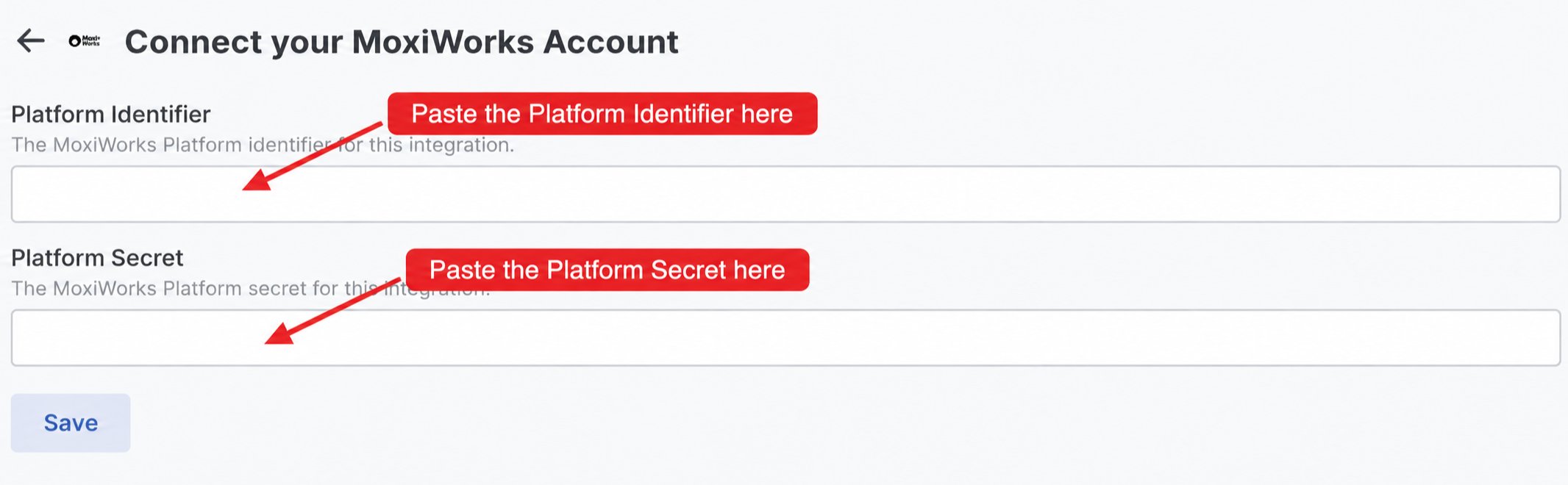
If the connection does not finish
MoxiWorks rejects the credentials
MoxiWorks rejects the credentials
Confirm that the Platform Identifier and Platform Secret belong to the same environment and that you did not use MoxiWorks OAuth client credentials instead.