> ## Documentation Index
> Fetch the complete documentation index at: https://rollout.com/docs/llms.txt
> Use this file to discover all available pages before exploring further.
# Sisu
> Copy the API Authorization value from Sisu and enter it in the connection form.
## Get your Sisu API Authorization value
You must be a Sisu team administrator or transaction coordinator with access to Team Settings.
Sign into [Sisu](https://my.sisu.co/), then open **Admin → Team Settings → API Credentials/Webhooks**.
You can also open the [Sisu API Credentials page](https://my.sisu.co/admin/api-credentials) directly after signing in.
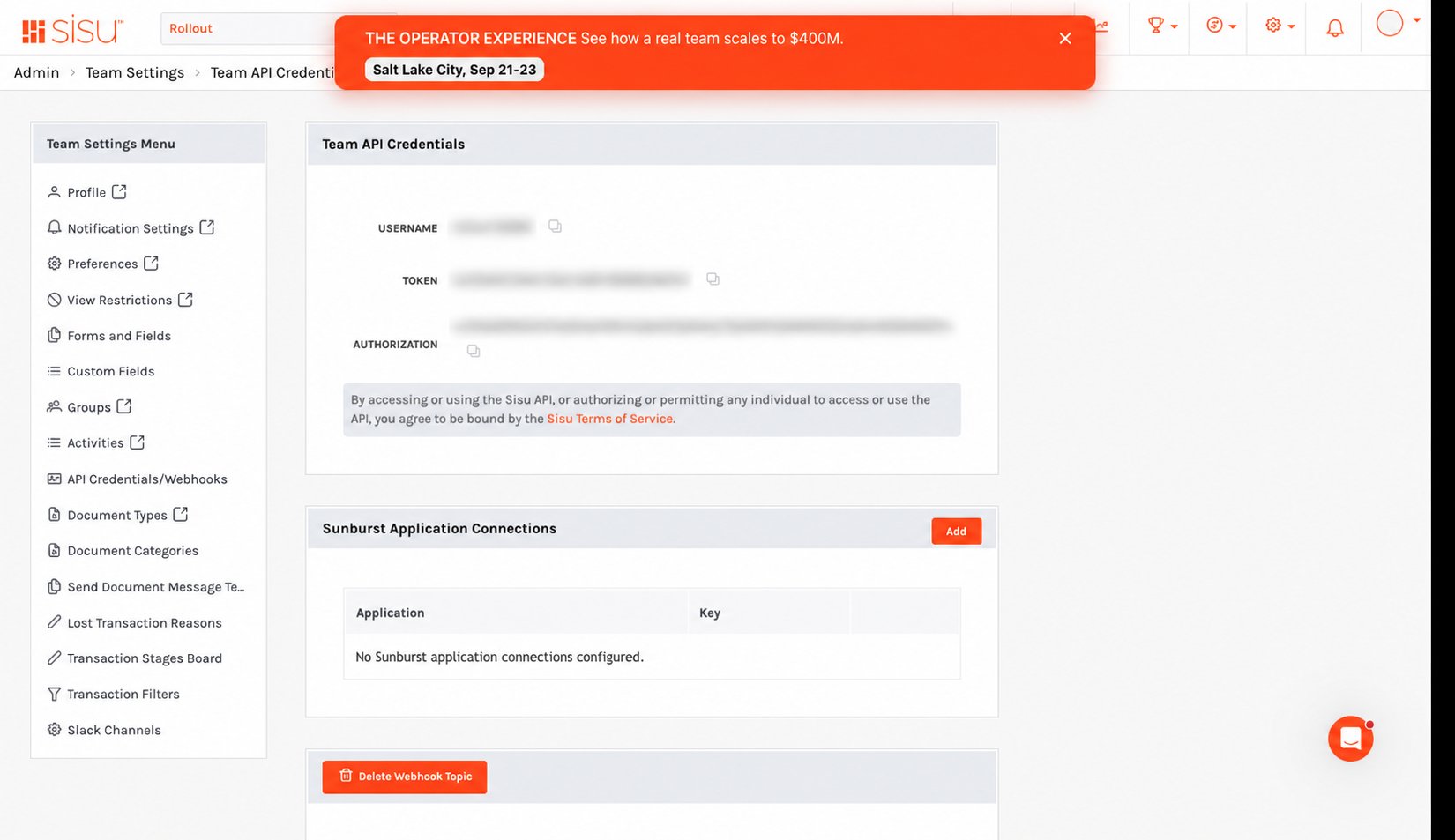 In **Team API Credentials**, use the copy icon beside **Authorization**. Rollout requires the Authorization value, not the separate Username or Token values.
Return to the Sisu connection form, paste the copied value into **API Authorization**, and select **Save**.
Treat the Authorization value like a password. Do not email it or include it in screenshots.
In **Team API Credentials**, use the copy icon beside **Authorization**. Rollout requires the Authorization value, not the separate Username or Token values.
Return to the Sisu connection form, paste the copied value into **API Authorization**, and select **Save**.
Treat the Authorization value like a password. Do not email it or include it in screenshots.